▼
Getting Started
▼
How To
- Simple Number Setup
- Simple Call Flow Setup
- Setup Voicemail
- Create a New Extension
- Edit Phone Buttons
- Create a Conference Bridge
- Create a Fax Extension
- Setup e911
- Ordering Phone Numbers
- Porting Phone Numbers
- Simple Call Flow Menu Setup
- Simple Hours Schedule
- Creating Agents
- Design an Auto-attendant
- Hotdesk
- Test e911
- Create a Routing Extension
- Create Cascading Rings
- Create Cascading Ring to Queue
- Adding a Forward
- Limit 800 Spammers
- Find Call Records
- How To…
▼
Preferences
▼
Management
▼
Phone Admin Guide
▼
Call Flows
▼
API Reference
Home ›
Ordering Phone Numbers
Ordering Phone Numbers
To begin using WebFones, the first step is to attach a phone number to your phone system. Follow the steps below to order new numbers.
Steps to Order a Phone Number
Step #1. Go to the Numbers page and click the (+) button to add a new phone number.
Step #2. Select your State, if it is not already chosen.
Step #3. To search for a specific number pattern, click the [+] button to add a search filter.
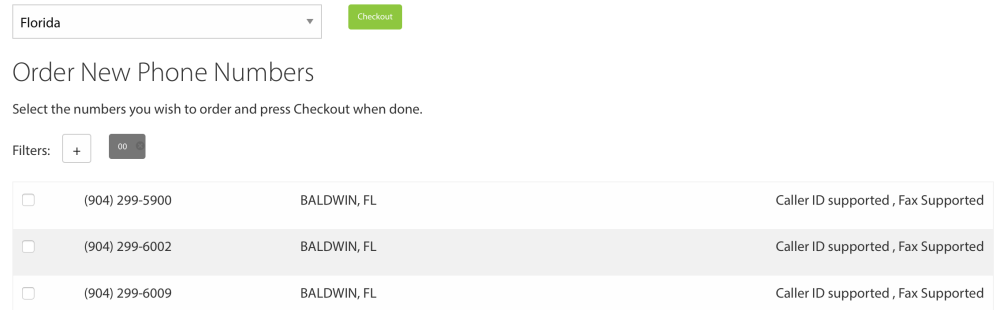
Step #4. Check the boxes next to the numbers you want to order.
Step #5. Click the Checkout button.
Step #6. Choose the initial destination routing for the number.
You can update this routing at any time after the number is active.
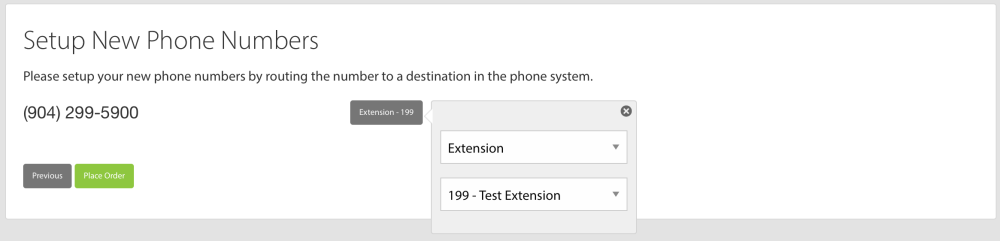
Step #7. Press the Place Order button.
Your new number(s) will typically become available within about 5 minutes.