▼
Getting Started
▼
How To
- Simple Number Setup
- Simple Call Flow Setup
- Setup Voicemail
- Create a New Extension
- Edit Phone Buttons
- Create a Conference Bridge
- Create a Fax Extension
- Setup e911
- Ordering Phone Numbers
- Porting Phone Numbers
- Simple Call Flow Menu Setup
- Simple Hours Schedule
- Creating Agents
- Design an Auto-attendant
- Hotdesk
- Test e911
- Create a Routing Extension
- Create Cascading Rings
- Create Cascading Ring to Queue
- Adding a Forward
- Limit 800 Spammers
- Find Call Records
- How To…
▼
Preferences
▼
Management
▼
Phone Admin Guide
▼
Call Flows
▼
API Reference
Home ›
API Preferences
API Preferences
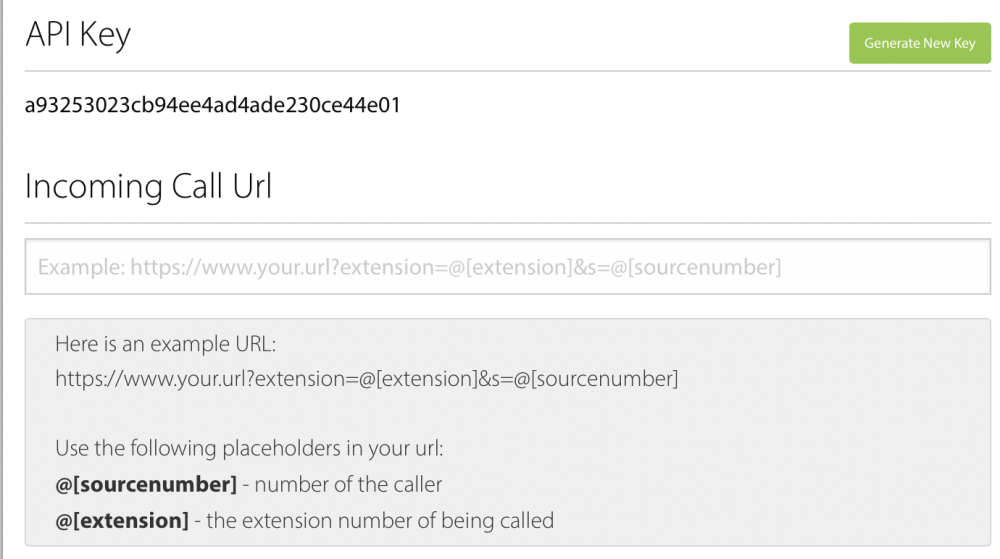
The API Preferences screen lets you configure and manage your WebFones API access. To open it, select the gear menu in your phone system administration area and choose API Preferences. The API needs to be enabled before you can connect to it. Refer to the API section for examples and documentation.
API Token
Your company-wide API token is displayed on this screen. This token is used to authenticate all API requests and works with Zapier integrations.
API Capabilities
The WebFones API provides access to:
- Contact Management - Sync contact data between internal software and WebFones
- Text Messaging - Send and receive text messages programmatically
- Click-to-Dial - Dial phone extensions from your company's software
- Call Notifications - Receive screen pops for incoming calls inside company software
- Call Records - Download call records into CRM software
Security
- Keep your API token secure and do not share it publicly
- Regenerate your token if you suspect it has been compromised
- API access is company-wide, so all users share the same token